文章目录
Cesium 内置 scene.fog 主要服务于远距离大气混合和性能优化。如果需要“低海拔浓、高海拔淡”的山谷雾,可以在场景渲染完成后增加一个 PostProcessStage。
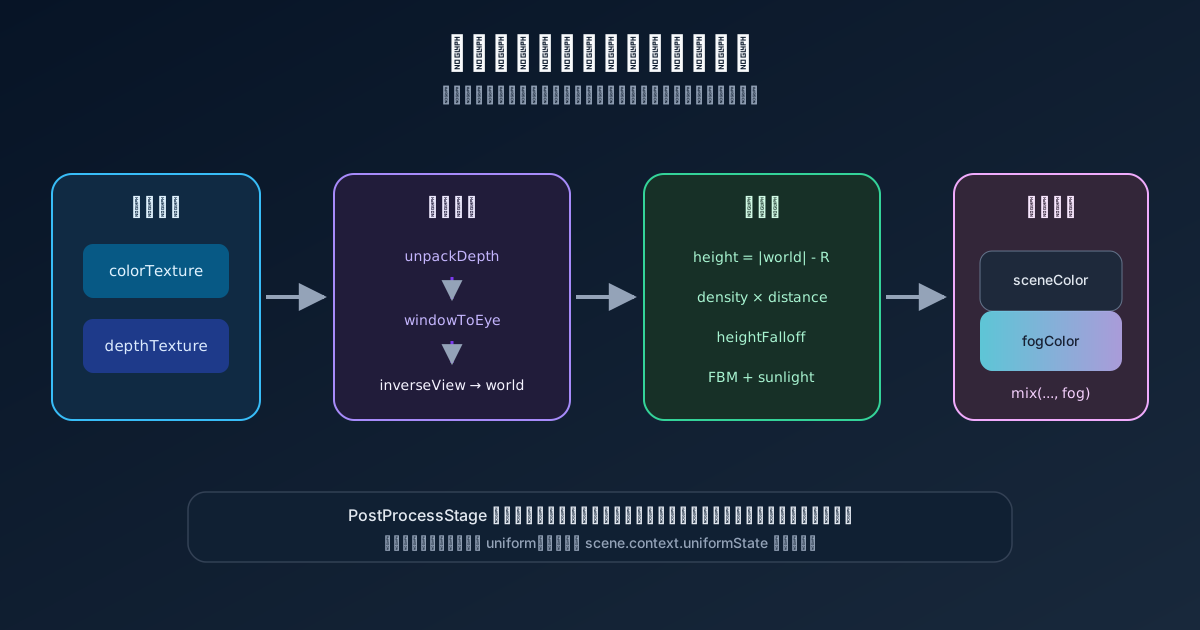
后处理阶段拿到的是屏幕颜色和深度。要根据海拔计算雾,第一步必须把每个像素的深度恢复成世界坐标。
PostProcessStage 的输入
const stage = new Cesium.PostProcessStage({
  fragmentShader,
  uniforms: {
    u_fogColor: Cesium.Color.fromCssColorString('#a8c8e8'),
    u_fogHeight: 4000,
    u_globalDensity: 0.01,
    u_fogStartDistance: 50,
  },
})

viewer.scene.postProcessStages.add(stage)
Cesium 为后处理片元着色器提供两个常用纹理:
uniform sampler2D colorTexture;
uniform sampler2D depthTexture;
in vec2 v_textureCoordinates;
colorTexture 是当前场景颜色,depthTexture 是对应像素的场景深度。
从深度恢复世界坐标
vec4 getWorldCoordinate(vec2 uv) {
  float depth = czm_unpackDepth(texture(depthTexture, uv));

  if (depth <= 0.0) {
    return vec4(0.0);
  }

  vec4 eye = czm_windowToEyeCoordinates(
    gl_FragCoord.xy,
    depth
  );

  return czm_inverseView * (eye / eye.w);
}
执行顺序是:
- 从深度纹理解包当前像素深度。
- 把窗口坐标恢复到眼坐标。
- 除以齐次分量
w。 - 通过逆视图矩阵转换到世界坐标。
天空像素没有有效场景深度,应直接返回原颜色:
vec4 positionWC = getWorldCoordinate(v_textureCoordinates);
if (length(positionWC) <= 0.0) {
  out_FragColor = texture(colorTexture, v_textureCoordinates);
  return;
}
用世界坐标估算像素高度
局部范围可以用世界坐标模长减去当地椭球半径近似高度:
float pixelHeight = length(positionWC.xyz) - u_localEarthRadius;u_localEarthRadius 可以在相机位置估算:
u_localEarthRadius: () =>
  Cesium.Cartesian3.magnitude(viewer.camera.positionWC) -
  viewer.camera.positionCartographic.height
这是一种局部近似。WGS84 是椭球,不同纬度的地心半径不同。大范围视角或要求严格海拔时,应在 Shader 中执行椭球坐标转换,或使用更准确的高度重建方法。
高度因子决定雾出现在哪
if (pixelHeight > u_fogHeight) {
  out_FragColor = sceneColor;
  return;
}

float heightFactor = 1.0 - smoothstep(
  0.0,
  u_fogHeight,
  pixelHeight
);
heightFactor = pow(heightFactor, 2.0);
高度接近 0 时 heightFactor 接近 1;接近 u_fogHeight 时逐渐变成 0。平方让雾更多集中在低海拔区域。
负高度场景要单独定义规则。直接进入上式会得到超过 1 的输入语义,虽然 smoothstep 结果仍受限制,但地下空间是否应该有雾属于业务决定。
距离使用指数消光
vec3 cameraToPixel = positionWC.xyz - czm_viewerPositionWC;
float distanceToCamera = length(cameraToPixel);

if (distanceToCamera < u_fogStartDistance) {
  out_FragColor = sceneColor;
  return;
}

float effectiveDistance =
  distanceToCamera - u_fogStartDistance;
float density =
  u_globalDensity * 0.001 * heightFactor;
float fogAlpha = 1.0 - exp(-effectiveDistance * density);
fogAlpha = clamp(fogAlpha, 0.0, 1.0);
指数形式能让近处缓慢增加、远处逐渐趋于完全雾化,比线性插值更自然。
u_globalDensity、距离单位和乘数 0.001 共同决定实际强度。参数面板应给出有限范围,避免轻微滑动就让画面完全变白。
用 FBM 打破均匀雾层
纯高度和距离函数会形成一层均匀薄膜。可以叠加多频率噪声:
float fbm(vec2 p) {
  float value = 0.0;
  float amplitude = 0.5;
  float frequency = 1.0;

  for (int i = 0; i < 4; i++) {
    value += amplitude * noise(p * frequency);
    frequency *= 2.0;
    amplitude *= 0.5;
  }

  return value;
}
使用世界坐标和时间驱动流动:
vec2 fogCoordinate = positionWC.xy * 0.00005;
vec2 movement = vec2(u_time, u_time * 0.5) * u_windSpeed;
float flow = fbm(fogCoordinate + movement);
float noiseFactor = mix(1.0, flow, u_turbulence);

density *= noiseFactor;
直接使用 ECEF 的 xy 会让纹理方向与当地东、北方向不一致。局部工程场景可以把世界位置转换到 ENU,再取局部 xy 生成噪声。
增加朝向光源的散射
vec3 viewDirection = normalize(cameraToPixel);
float sunDot = max(dot(viewDirection, u_sunDirection), 0.0);
float scatter = pow(sunDot, 12.0) * u_scatterStrength;
scatter *= fogAlpha;

vec3 sunColor = vec3(1.0, 0.9, 0.7);
vec3 fogColor = mix(
  u_fogColor,
  sunColor,
  pow(sunDot, 4.0) * 0.5
);
当视线方向接近光线方向时,雾色会偏暖并增强。
案例源码从 scene.context.uniformState.sunDirectionWC 读取太阳方向。这个路径属于 Cesium 内部状态,不应当成稳定 API。文章实现更适合由业务层维护 u_sunDirection,或者在应用明确使用 DirectionalLight 时读取自己设置的方向。
合成最终颜色
vec3 blended = mix(
  sceneColor.rgb,
  fogColor,
  fogAlpha
);
blended += sunColor * scatter * 0.5;

out_FragColor = vec4(blended, sceneColor.a);
后处理只改 RGB,保留原场景 alpha。若后面还有 Bloom、FXAA 或其他 Stage,要检查执行顺序,因为每个 Stage 的输入可能是前一个 Stage 的输出。
时间更新要与帧率解耦
每帧固定加 0.01 会让不同刷新率设备上的流动速度不同。使用真实时间差:
let elapsedSeconds = 0
let previousTime = performance.now()

const updateTime = () => {
  const now = performance.now()
  elapsedSeconds += (now - previousTime) / 1000
  previousTime = now
}

viewer.scene.preRender.addEventListener(updateTime)
uniform 使用函数读取当前时间:
uniforms: {
  u_time: () => elapsedSeconds,
}
如果开启 requestRenderMode,动态雾需要持续请求渲染,否则时间变化不会自动产生新画面。
封装参数和预设
interface HeightFogParams {
  fogColor: Cesium.Color
  fogHeight: number
  globalDensity: number
  fogStartDistance: number
  scatterStrength: number
  windSpeed: number
  turbulence: number
}

function applyPreset(preset: HeightFogParams) {
  Object.assign(params, preset)
  viewer.scene.requestRender()
}
Uniform 函数每帧读取 params,修改参数时不需要销毁并重建 Stage。
销毁顺序
function destroy() {
  viewer.scene.preRender.removeEventListener(updateTime)
  viewer.scene.postProcessStages.remove(stage)
}
从 postProcessStages 移除后,不要再更新该 Stage。时间监听器也必须解除,否则它仍会保留参数对象和 Viewer 引用。
高度雾的主线是:深度恢复世界坐标,世界坐标得到近似高度和相机距离,再用指数消光、噪声和光照散射计算混合比例。它依赖深度纹理,是屏幕空间效果,不会生成真实体积雾数据。