文章目录
在相机覆盖范围、传感器方向和视频投影视场等场景中,经常需要把视锥体本身画出来。
本文构造的是“视锥可视化 Primitive”。它不会替换 Cesium Camera 的真实 frustum,也不会自动参与相机剔除或可视域判断。
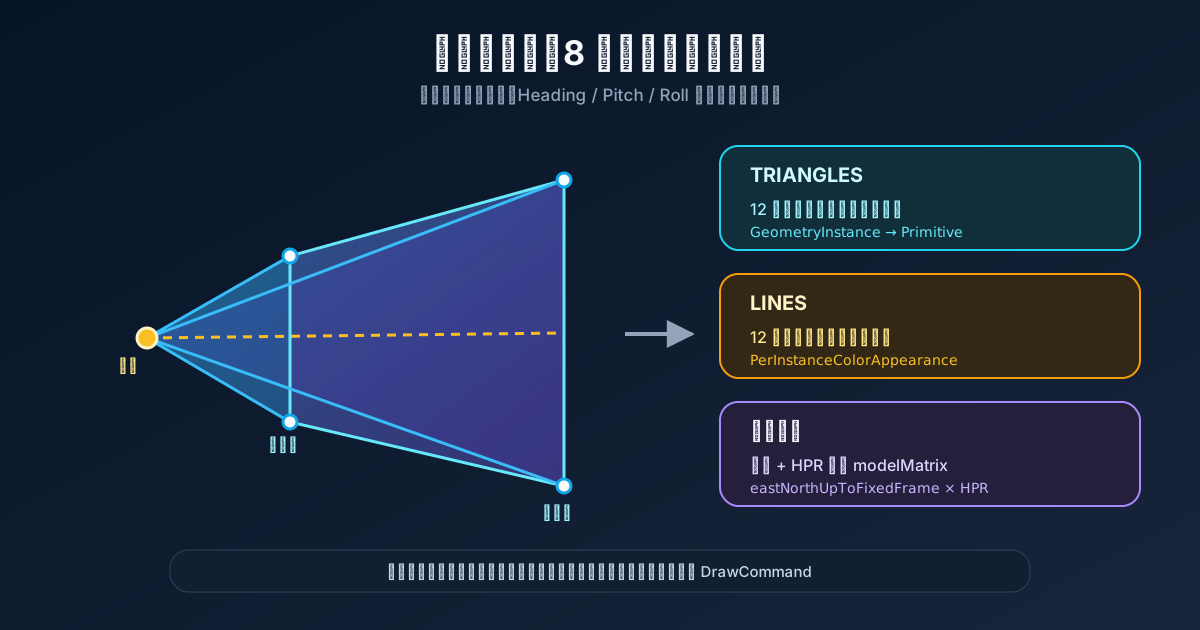
视锥体由六个参数决定
interface FrustumOptions {
  position: Cesium.Cartesian3
  heading: number
  pitch: number
  roll: number
  horizontalFov: number
  verticalFov: number
  near: number
  far: number
}
参数约束:
if (horizontalFov <= 0 || horizontalFov >= 180) {
  throw new Error('horizontalFov 必须位于 0 到 180 度之间')
}
if (verticalFov <= 0 || verticalFov >= 180) {
  throw new Error('verticalFov 必须位于 0 到 180 度之间')
}
if (near <= 0 || far <= near) {
  throw new Error('near 必须大于 0,far 必须大于 near')
}
接近 180 度时 tan(fov / 2) 会快速增大,几何尺寸和数值误差都会失控,因此必须限制范围。
先在局部坐标构造近远截面
设局部相机朝向负 Z 轴。距离为 d 的截面半宽和半高为:
halfWidth  = d × tan(horizontalFov / 2)
halfHeight = d × tan(verticalFov / 2)
代码:
const halfHorizontal = Cesium.Math.toRadians(horizontalFov / 2)
const halfVertical = Cesium.Math.toRadians(verticalFov / 2)

const nearHalfWidth = near * Math.tan(halfHorizontal)
const nearHalfHeight = near * Math.tan(halfVertical)
const farHalfWidth = far * Math.tan(halfHorizontal)
const farHalfHeight = far * Math.tan(halfVertical)
八个局部顶点:
const localVertices = new Float64Array([
  -nearHalfWidth, -nearHalfHeight, -near,
   nearHalfWidth, -nearHalfHeight, -near,
   nearHalfWidth,  nearHalfHeight, -near,
  -nearHalfWidth,  nearHalfHeight, -near,

  -farHalfWidth, -farHalfHeight, -far,
   farHalfWidth, -farHalfHeight, -far,
   farHalfWidth,  farHalfHeight, -far,
  -farHalfWidth,  farHalfHeight, -far,
])
局部轴约定必须和姿态计算一致。若业务把正 X 当成传感器前方,就要重新排列顶点,不能只改变量名。
用三角形索引组成六个面
const triangleIndices = new Uint16Array([
  0, 1, 2, 0, 2, 3, // 近截面
  4, 6, 5, 4, 7, 6, // 远截面
  0, 3, 7, 0, 7, 4, // 左面
  1, 5, 6, 1, 6, 2, // 右面
  0, 4, 5, 0, 5, 1, // 下面
  3, 2, 6, 3, 6, 7, // 上面
])
每个面用两个三角形。半透明视锥一般不需要复杂光照,可使用 PerInstanceColorAppearance 的 flat 模式。
把局部视锥转换到地球世界坐标
位置是 ECEF Cartesian3,姿态是当地 heading、pitch、roll:
const hpr = new Cesium.HeadingPitchRoll(
  Cesium.Math.toRadians(heading),
  Cesium.Math.toRadians(pitch),
  Cesium.Math.toRadians(roll),
)

const orientation = Cesium.Transforms.headingPitchRollQuaternion(
  position,
  hpr,
)

const transform = Cesium.Matrix4.fromTranslationQuaternionRotationScale(
  position,
  orientation,
  new Cesium.Cartesian3(1, 1, 1),
)
逐点变换:
function transformVertices(
  vertices: Float64Array,
  transform: Cesium.Matrix4,
) {
  const result = new Float64Array(vertices.length)

  for (let index = 0; index < vertices.length; index += 3) {
    const local = new Cesium.Cartesian3(
      vertices[index],
      vertices[index + 1],
      vertices[index + 2],
    )
    const world = Cesium.Matrix4.multiplyByPoint(
      transform,
      local,
      new Cesium.Cartesian3(),
    )

    result[index] = world.x
    result[index + 1] = world.y
    result[index + 2] = world.z
  }

  return result
}
这里不能只做 world = position + local,因为当地坐标轴需要随经纬度和姿态旋转。
创建 Cesium Geometry
const geometry = new Cesium.Geometry({
  attributes: {
    position: new Cesium.GeometryAttribute({
      componentDatatype: Cesium.ComponentDatatype.DOUBLE,
      componentsPerAttribute: 3,
      values: worldVertices,
    }),
  } as Cesium.GeometryAttributes,
  indices: triangleIndices,
  primitiveType: Cesium.PrimitiveType.TRIANGLES,
  boundingSphere: Cesium.BoundingSphere.fromVertices(worldVertices),
})
世界坐标量级很大,位置使用 DOUBLE。包围球用于 Cesium 的视锥剔除;漏掉它可能让 Primitive 缺少正确的可见性边界。
主体、轮廓和中心线分开渲染
主体:
const body = new Cesium.Primitive({
  geometryInstances: new Cesium.GeometryInstance({
    geometry,
    attributes: {
      color: Cesium.ColorGeometryInstanceAttribute.fromColor(
        Cesium.Color.YELLOW.withAlpha(0.25),
      ),
    },
  }),
  appearance: new Cesium.PerInstanceColorAppearance({
    flat: true,
    closed: true,
    translucent: true,
  }),
  asynchronous: false,
})
轮廓使用相同八个顶点,但索引改成线段:
const lineIndices = new Uint16Array([
  0, 1, 1, 2, 2, 3, 3, 0,
  4, 5, 5, 6, 6, 7, 7, 4,
  0, 4, 1, 5, 2, 6, 3, 7,
])
中心线只连接近截面中心和远截面中心:
const centerLine = new Cesium.PolylineGeometry({
  positions: [nearCenterWorld, farCenterWorld],
  width: 2,
  arcType: Cesium.ArcType.NONE,
  vertexFormat: Cesium.PolylineMaterialAppearance.VERTEX_FORMAT,
})
三者拆开后可以独立控制透明度、虚线和显示状态。
自定义 Primitive 的 update 协议
要让一个自定义对象加入 scene.primitives,它需要在每帧接受 frameState 并把内部 Primitive 的命令提交给 Cesium:
class FrustumPrimitive {
  show = true
  private dirty = true
  private primitive: FrustumPrimitiveCollection | null = null

  update(frameState: Cesium.FrameState) {
    if (!this.show) return

    if (this.dirty) {
      this.primitive?.destroy()
      this.primitive = this.createPrimitive()
      this.dirty = false
    }

    this.primitive.update(frameState)
  }
}
FrameState 没有作为稳定公开构造类型供业务创建,但 PrimitiveCollection 会在渲染阶段传入它。自定义 Primitive 只消费,不自行实例化。
参数更新只标记 dirty
set horizontalFov(value: number) {
  if (value <= 0 || value >= 180) return
  if (value === this._horizontalFov) return

  this._horizontalFov = value
  this.dirty = true
}
UI 滑块修改姿态或视场角时,先更新状态并标记需要重建。下一帧统一销毁旧几何、创建新几何。这样不会在一个同步调用栈中重复重建多次。
如果参数每帧变化,持续销毁和新建 Primitive 会产生明显开销。高频动画应改为固定局部几何,通过 modelMatrix 更新姿态,或把可变参数放进 Shader。
销毁内部三个 Primitive
destroy() {
  if (this.body && !this.body.isDestroyed()) this.body.destroy()
  if (this.outline && !this.outline.isDestroyed()) this.outline.destroy()
  if (this.centerLine && !this.centerLine.isDestroyed()) {
    this.centerLine.destroy()
  }
}
外层对象拥有主体、轮廓和中心线,所以由外层统一销毁。已经被 scene.primitives.remove 自动销毁的对象不要再次使用。
它不等于真正的相机视锥
这个 Primitive 只是把参数画出来:
- 不会改变
viewer.camera.frustum。 - 不会决定哪些对象被 Cesium 剔除。
- 不会自动生成深度图。
- 不会自动得到可见和不可见区域。
如果需要模拟摄像机画面,应另外创建或临时配置 Camera;如果需要可视域,要增加 ShadowMap、深度比较或地形采样算法。
自定义视锥体的主线是:在局部相机坐标中计算八个角点,通过 HPR 变换到 ECEF 世界坐标,再分别构造主体三角形、轮廓线和中心线。可视化几何和真实相机状态必须保持概念分离。