文章目录
Cesium 加载 GLB 有两条常用路径:把模型放进 Entity,或者直接创建 Model Primitive。两种方式加载的是同一种 glTF/GLB 资源,但状态组织、动画控制和生命周期不同。
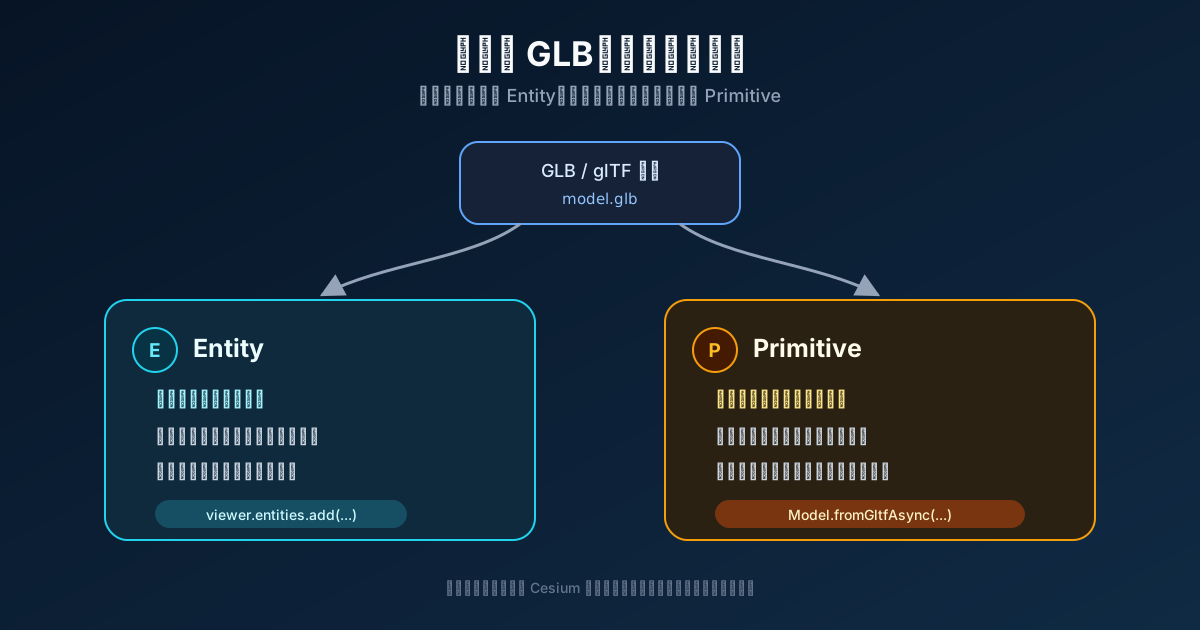
选择标准不是“哪种 API 更高级”,而是模型是否需要进入 Cesium 的数据驱动层。
Entity 路径:让 Cesium 管理模型属性
const position = Cesium.Cartesian3.fromDegrees(
  116.39,
  39.9,
  1000,
)
const hpr = new Cesium.HeadingPitchRoll(
  Cesium.Math.toRadians(30),
  0,
  0,
)

const entity = viewer.entities.add({
  position,
  orientation: Cesium.Transforms.headingPitchRollQuaternion(position, hpr),
  model: {
    uri: '/models/airplane.glb',
    scale: 3,
    runAnimations: true,
  },
})
Entity 把位置、姿态和模型样式组织为 Property。它适合这些场景:
- 模型位置随时间变化。
- 需要和
SampledPositionProperty、时间轴或跟踪相机联动。 - 业务对象本身就是 Entity,需要统一拾取和管理。
- 希望用声明式属性更新模型。
模型位置和姿态由 Entity 决定,ModelGraphics 只描述 GLB 的显示属性。
更新 Entity 的位置、朝向和缩放
function updateEntityModel(
  entity: Cesium.Entity,
  longitude: number,
  latitude: number,
  height: number,
  heading: number,
  scale: number,
) {
  const position = Cesium.Cartesian3.fromDegrees(
    longitude,
    latitude,
    height,
  )
  const hpr = new Cesium.HeadingPitchRoll(
    Cesium.Math.toRadians(heading),
    0,
    0,
  )

  entity.position = new Cesium.ConstantPositionProperty(position)
  entity.orientation = new Cesium.ConstantProperty(
    Cesium.Transforms.headingPitchRollQuaternion(position, hpr),
  )

  if (entity.model) {
    entity.model.scale = new Cesium.ConstantProperty(scale)
  }
}
这里修改的是 Entity 当前状态。Cesium 的 DataSource 层会在场景更新阶段把它同步到内部 Model。
Primitive 路径:直接持有 Model
const position = Cesium.Cartesian3.fromDegrees(
  116.39,
  39.9,
  1000,
)
const hpr = new Cesium.HeadingPitchRoll(
  Cesium.Math.toRadians(30),
  0,
  0,
)

const model = await Cesium.Model.fromGltfAsync({
  url: '/models/airplane.glb',
  modelMatrix: Cesium.Transforms.headingPitchRollToFixedFrame(
    position,
    hpr,
  ),
  scale: 3,
})

viewer.scene.primitives.add(model)
fromGltfAsync 在 GLB、纹理、着色器和 WebGL 资源准备好后返回 Model。Primitive 路径适合:
- 需要直接访问
modelMatrix、boundingSphere和activeAnimations。 - 模型是渲染对象,不需要时间驱动 Property。
- 需要自定义 Shader、裁剪面或更底层的模型参数。
- 已经有自己的业务状态层,不想再经过 Entity。
Primitive 不等于自动获得批量渲染优化。循环创建一万个 Model,仍然是一万个运行时模型。大规模重复模型应使用 glTF GPU Instancing、3D Tiles 或专门的实例化方案。
Primitive 的变换集中在 modelMatrix
function updatePrimitiveModel(
  model: Cesium.Model,
  longitude: number,
  latitude: number,
  height: number,
  heading: number,
  scale: number,
) {
  const position = Cesium.Cartesian3.fromDegrees(
    longitude,
    latitude,
    height,
  )
  const hpr = new Cesium.HeadingPitchRoll(
    Cesium.Math.toRadians(heading),
    0,
    0,
  )

  model.modelMatrix = Cesium.Transforms.headingPitchRollToFixedFrame(
    position,
    hpr,
  )
  model.scale = scale
}
headingPitchRollToFixedFrame 把当地的姿态转换到地心地固坐标系。直接把经纬度当成 Matrix4 平移量,会得到错误位置。
两条动画控制路径
Entity 通过 runAnimations 控制模型内置动画:
entity.model!.runAnimations = new Cesium.ConstantProperty(true)Primitive 直接操作 activeAnimations:
model.readyEvent.addEventListener(() => {
  model.activeAnimations.add({
    index: 0,
    loop: Cesium.ModelAnimationLoop.REPEAT,
    multiplier: 1,
  })
})

// 停止全部动画
model.activeAnimations.removeAll()
如果不知道 GLB 有几个动画,可以在加载阶段读取 glTF JSON:
let animationCount = 0

const model = await Cesium.Model.fromGltfAsync({
  url,
  modelMatrix,
  gltfCallback: gltf => {
    animationCount = gltf.animations?.length ?? 0
  },
})
调用 activeAnimations.add 前应检查动画数量,不能假设所有模型都包含索引 0。
批量加载不要长时间占住主线程
Entity 创建本身是同步操作。一次循环添加太多对象,会让 Vue 面板和地图交互暂停。可以分批让出事件循环:
const batchSize = 10

for (let index = 0; index < positions.length; index += 1) {
  if (aborted) break

  addEntityModel(positions[index])

  if ((index + 1) % batchSize === 0) {
    await new Promise<void>(resolve => setTimeout(resolve, 0))
  }
}
Primitive 还要等待每个 fromGltfAsync。如果逐个 await,请求和资源创建会串行执行;如果全部 Promise.all,瞬时网络和 GPU 压力又可能过高。实际项目可以使用固定并发数的任务池。
取消标记解决的是过期结果
浏览器已经发出的模型请求不一定能通过一个布尔值取消,但可以阻止过期模型进入场景:
let loadVersion = 0

async function loadModel(url: string, modelMatrix: Cesium.Matrix4) {
  const version = ++loadVersion
  const model = await Cesium.Model.fromGltfAsync({ url, modelMatrix })

  if (version !== loadVersion) {
    model.destroy()
    return
  }

  viewer.scene.primitives.add(model)
}

function cancelLoading() {
  loadVersion += 1
}
这个版本号防止旧异步结果写入当前场景,不代表网络传输被中止。
网格排布只适合局部区域
案例中可以把米近似换算成经纬度差,快速生成模型网格:
const metersPerDegreeLat = 111320
const metersPerDegreeLon = 111320 * Math.cos(latitudeRadians)

const longitudeOffset = xMeters / metersPerDegreeLon
const latitudeOffset = yMeters / metersPerDegreeLat
这种换算适合城市尺度的演示。范围扩大、高纬度或跨经线场景,应在局部 ENU 坐标中生成偏移,再转换到世界坐标。
飞行范围也分两条路径
Entity 可以直接交给 zoomTo:
await viewer.zoomTo(entityModels)Primitive 则合并各模型的世界包围球:
const spheres = primitiveModels.map(model => model.boundingSphere)
const combined = Cesium.BoundingSphere.clone(spheres[0])

for (let index = 1; index < spheres.length; index += 1) {
  Cesium.BoundingSphere.union(combined, spheres[index], combined)
}

viewer.camera.flyToBoundingSphere(combined)
Model 的包围球不包含骨骼动画、蒙皮或变形目标运动后的范围,因此大幅动画可能超出这个飞行范围。
清理各自拥有的对象
function clearModels() {
  entityModels.forEach(entity => viewer.entities.remove(entity))
  entityModels.length = 0

  primitiveModels.forEach(model => {
    viewer.scene.primitives.remove(model)
  })
  primitiveModels.length = 0
}
PrimitiveCollection 默认负责销毁被移除的 Primitive。不要在移除后继续读写 Model,也不要无条件再次调用 destroy。
Entity 和 Primitive 的区别可以收成一句话:Entity 面向随时间变化的业务对象,Primitive 面向直接受控的渲染对象。模型数量足够大时,两者都不是实例化渲染的替代品。